一段飲品影片怎麼做六個角度?主片、冰塊補鏡與剪輯完整教學
把一段飲品原片做成多角度短片,可以先安排六個畫面任務,生成主片,再將難以完成的冰塊鏡頭獨立補做,最後剪回主片。這裡的六個角度是生成視角,不是現場六台攝影機的紀錄。
以下以本站飲品案例說明主片、補鏡與剪輯的分工,並提供兩份對應指令。模型、模式、片長與解析度是案例設定,不代表所有帳號目前都有相同選項。
三份素材各負責什麼?
先把表演與構圖分開指定,避免只寫「杯內仰拍」,卻沒有參考交代位置。
| 素材 | 案例紀錄 | 用途 |
|---|---|---|
| 主動作影片 | 約 14.5 秒 | 交代人物、道具與動作順序 |
| 冰塊動作片 | 5 秒 | 專門交代落下與入水動作 |
| 杯內構圖圖 | 1 張 | 說明鏡頭位於杯內的觀看方向 |
先核對人物、杯把、瓶子與場景,再生成。原片沒有拍到的新角度仍需檢查,不把生成液體或配料當實際飲品品質證明。
飲品案例的鏡頭安排與生成設定
可沿用鏡頭分工與檢查方法;道具、顏色、秒點及素材標記應換成自己的版本。480p 探路與 1080p 正式版屬原紀錄,送出前仍需核對目前設定與扣點。
本例流程:Higgsfield・Seedance 2.0 Fast 480p 探路 → Seedance 2.5(omni_reference)1080p 正式版+補鏡。
準備三份素材
先把下面的檔案整理好。影片交代「怎麼動」,圖片交代「從哪裡看」。
主影片參考|約 14.5 秒
剪掉等待空檔,保留開瓶、倒入、加冰、加汽水、喝一口的完整動作。
補鏡動作參考|5 秒
留下冰塊進入杯子的動作,供後面單獨補鏡使用。
補鏡構圖參考|1 張
從杯內向上看杯口的圖片,讓 AI 知道鏡頭應該放在哪裡。
先固定人物衣服、杯把方向、瓶身和場景。原片沒有拍到的角度由 AI 生成,完成後要逐鏡檢查。
進入 Higgsfield
使用下方連結前往平台,依畫面完成註冊或登入,再確認帳號能使用所需模型與影片參考功能。
前往 Higgsfield 註冊 ↗
超直白推薦連結
產生影片前,先看清楚此次設定與點數。這篇不要求先買指定方案;可用功能與費用以帳號當下顯示為準。
先看懂六個鏡頭
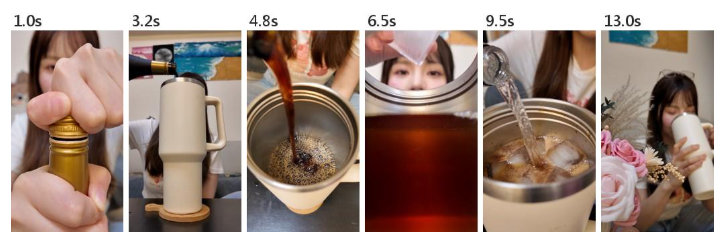
圖片提供細節參考。圖上秒數是截圖時間,不是每一鏡的長度。
- 0–2.5 秒|開瓶 放大手與瓶蓋,讓動作清楚。
- 2.5–4 秒|桌面倒入 看瓶口與杯子的位置。
- 4–5.5 秒|上方俯拍 看液體進入杯內。
- 5.5–8 秒|杯內仰拍 從杯裡向上看冰塊落下。
- 8–11 秒|加入汽水 看透明汽水、氣泡和液體顏色。
- 11–15 秒|喝一口 回到人物,完成動作後短暫停留。
這裡的「六機位」是六種生成角度,不是現場架六台攝影機。秒數用來規劃節奏,最後仍需依生成結果剪輯。
選設定,複製主影片 Prompt
先用低解析度確認動作與角度,再做正式版。同一份 Prompt 換模型後,仍要重新檢查結果。
| 項目 | 案例紀錄 |
|---|---|
| 方向測試 | Seedance 2.0 Fast,480p |
| 正式版 | Seedance 2.5(omni_reference),1080p |
| 長度與比例 | 15 秒、9:16 直式 |
| 聲音任務 | 開蓋、倒水、冰塊聲,不加配樂或旁白 |
先加入主影片參考,再貼下方指令。@video1 代表你的參考影片,請改成介面實際素材標記;模型、秒數與解析度要在生成設定中確認。
範例使用黑瓶、奶油色杯子、綠色汽水瓶和玫瑰。你的道具不同,就先改 Prompt 裡的物件描述。
主影片 Prompt|六個角度
加入原片後複製,替換素材標記與道具描述,再確認生成設定。
主影片 Prompt|六個角度
ACTIVE REFERENCE
@video1 is the uploaded 14.5-second reference performance.

Use the reference video as the exact source performance. A young woman with long brown hair and blunt bangs, clear glasses pushed up on top of her head, white T-shirt, sitting at a dark wooden table against a plain cream wall with a small cartoon cutout and a row of framed art above her. On the table: a black bottle with a gold neck and a fruit-illustrated label, a large cream-colored tumbler with a handle on a round wooden coaster, a clear ice cube tray, a green bottle of clear lemon-lime soda (like Sprite), pink roses in a cream vase, a pink lucky-cat figurine. Soft even indoor daylight, warm cozy tone. Vertical 9:16. Multi-camera coverage of one continuous performance: same actions, same timing, same hands, hard cuts between camera angles on the action beats.

THE DRINK
The liquid from the black bottle is deep amber. The soda is completely clear and colorless, like Sprite. After the ice and soda are added, the drink becomes a clear, transparent, lighter sparkling amber with fizzing bubbles, like iced tea with soda. Never white, beige, milky, creamy or cloudy at any moment.

[00:00-02.50] Shot 1: Extreme close-up of her hands twisting the cap off the black bottle; the cap cracks open at 00:01.00. Macro lens, very shallow depth of field, the gold neck catching the light. Hard cut to Shot 2.
[02.50-04.00] Shot 2: Low angle at table height beside the tumbler, the deep amber liquid starts pouring from the black bottle into the tumbler. Hard cut to Shot 3.
[04.00-05.50] Shot 3: Top-down overhead looking straight into the tumbler, the deep amber stream pours from the black bottle's neck at the top of frame and splashes into the amber liquid, a ring of foamy bubbles forming on the surface, her white T-shirt soft beyond the rim. Hard cut to Shot 4.
[05.50-08.00] Shot 4: Macro slow motion from inside the tumbler looking up, her fingers drop an ice cube that plunges into the amber liquid exactly at 00:07.20, bubbles and ripples, her face blurred above the rim. Hard cut to Shot 5.
[08.00-11.00] Shot 5: Close-up at the rim of the tumbler from the side, crystal-clear Sprite-like soda pours from the green bottle over the ice, the deep amber lightens into a clear sparkling light amber, lively fizz and rising bubbles. Hard cut to Shot 6.
[11.00-15.00] Shot 6: Shot from behind the pink roses as a soft foreground, the camera slides sideways to reveal her lifting the tumbler and drinking, eyes closing, a satisfied relaxed expression. Finish the action by 14.50 seconds, then hold the final frame until 15.00 seconds.

SOUND (ASMR, no music, no voice)
00:00-01.00: the black glass bottle has a metal screw cap; as she twists it, the cap's perforated seal ring breaks with a crisp, small metallic click-crack, followed by a faint metal-on-glass scrape as the cap unscrews. NOT a soda can: no pop, no fizz, no hiss, no pressure release on this bottle.
Then: a gentle glug and liquid splash as the amber liquid pours; a bright glassy clink and a deep plunk as the ice cube drops in at 00:07.20; a sharp fizzy hiss only when the green soda bottle is poured, with crackling bubbles; soft sips at the end.

CONSISTENCY
Her face, hair, glasses, clothing and every prop must match the reference video in every shot. Hands keep five natural fingers. Bottle labels stay soft and unreadable; no new text or logos.
The room is only what is in the reference: the cream wall, the art above her, the sofa behind her. DO NOT add curtains, windows, shelves or any new furniture.
DO NOT add people. DO NOT change the props or their colors. DO NOT change the order or timing of her actions.
omni_reference 沿用本例製作紀錄的模式記法,不代表所有帳號都有同名按鈕。請確認目前模式支援影片參考。
冰塊鏡頭不好,就單獨補這一段
「補鏡」就是另外做一小段,換掉主影片中不理想的畫面。這裡繼續用 Seedance 2.5(omni_reference)1080p,生成 5 秒。
@video1|冰塊動作影片
控制冰塊怎麼落下。
@image1|杯內仰拍構圖
控制觀看位置,讓鏡頭真的在杯子裡。
此段只做冰塊入水,不同時要求倒汽水或喝一口。先確認角度正確,再看冰塊、氣泡和手指細節。
補鏡 Prompt|杯內仰拍冰塊
加入冰塊動作影片與構圖圖,將 @video1、@image1 換成實際素材標記。
補鏡 Prompt|杯內仰拍冰塊
ACTIVE REFERENCES
@video1 is the 5-second ice-drop action reference. @image1 controls the inside-the-cup camera position and composition.

One single continuous shot, no cuts. Recreate exactly the camera position and composition of the reference image: a macro camera placed INSIDE the large cream-colored tumbler, looking straight up through the liquid toward the round steel rim opening. The lower two-thirds of the frame is deep amber liquid seen from within, backlit and glowing; the upper third is the circular rim opening, and through it the young woman from the reference video (long brown hair, blunt bangs, glasses pushed up on her head, white T-shirt) leans over and looks down into the cup, her face softly blurred.

Action, following the timing of the reference video: her fingers hold a clear ice cube above the rim, then drop it. At exactly 00:02.70 the ice cube plunges through the surface into the amber liquid in slow motion, a burst of bubbles and a swirling trail, the cube tumbling down toward the camera, ripples spreading across the underside of the surface. Afterwards small bubbles keep rising and the ice cube floats back up and bobs.

The liquid is clear, transparent, deep amber, like iced black tea. Never milky or cloudy. Soft even indoor daylight from above. Photoreal, shallow depth of field, crisp detail, vertical 9:16.

SOUND (ASMR, no music, no voice): quiet room tone, then at 00:02.70 a bright glassy clink and a deep muffled underwater plunk, followed by soft fizzing bubbles.

DO NOT show the outside of the cup. DO NOT cut to another angle. DO NOT add text, logos or other people.
把主影片與補鏡接起來
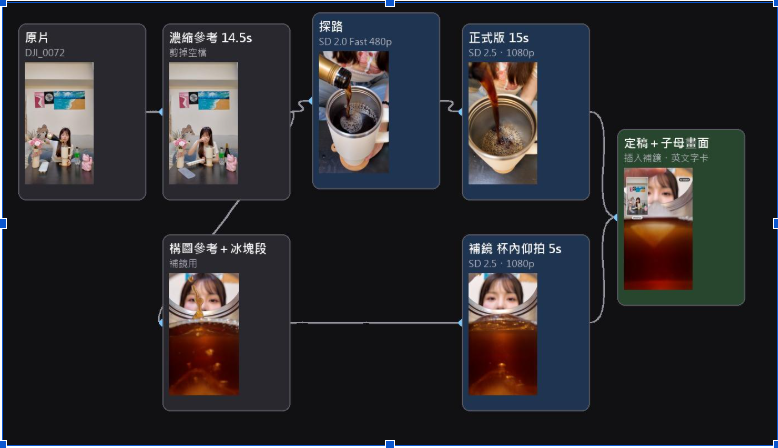
上排做主影片,下排補冰塊鏡頭,最後合併。圖片提供細節參考。
保留開瓶與倒入 → 換入冰塊補鏡 → 接回汽水與喝一口。 切點前後對齊杯口、手的高度、液體顏色和聲音。
不要直接照抄其他素材的截取秒數。先找到冰塊進入畫面、落水與氣泡的可用片段,再調整前後鏡頭長度。做原片/AI 子母畫面對照時,標清楚兩種畫面並對齊動作。
第一遍:看動作
開瓶、倒入、加冰、汽水、喝一口是否接得起來?
第二遍:看細節
人物、杯把、瓶子是否一致?飲料應保持透明琥珀色。
第三遍:聽聲音
金屬旋蓋不要變成開罐聲;冰塊和倒水聲要對上畫面。
模型與畫質選項,以 Higgsfield 畫面顯示為準。
主片有問題,什麼時候只補一鏡?
主題、前後動作與多數鏡頭已可用時,先處理局部。不必為杯內角度不理想,就反覆生成整支影片。
| 問題 | 先定位 | 可採取方向 |
|---|---|---|
| 杯內仰拍變成外部角度 | 構圖參考與鏡頭位置 | 單獨補鏡,先縮小任務 |
| 冰塊落水時間不合 | 動作參考與剪接點 | 依實際可用段落調整 |
| 液體顏色不同 | 原片、指令與相鄰鏡 | 核對同一色彩再替換 |
| 杯把方向跳動 | 前後手部與杯口 | 改切點、換結果或補真拍 |
| 開蓋聲像另一種容器 | 容器與音效內容 | 修正聲音,不以畫面通過取代聽檢 |
若整體人物、道具與順序都不符,先回到素材與主片任務,不能靠一個補鏡修好全部問題。
可以怎麼留下版本紀錄?
每個採用片段記原始任務、模型設定、對應素材、使用時間段與修改原因。正式版仍要檢查,不以低畫質測試成功推定高畫質必然一致。
想應用到餐點,可先看 餐飲真拍與 AI 五鏡安排;全片完成後用 三輪審片清單檢查。
常見問題
Prompt 裡寫 15 秒就會套用嗎?
文字描述是目標;實際片長、比例與畫質需在工具支援的設定中確認,結果再驗收。
六鏡都能當真實拍攝證據嗎?
不能。生成角度適合敘事與視覺,商品成分、容量與實際效果另有真實依據。
補鏡一定比較省費嗎?
需看實際用量與重做次數,不能從流程圖推算固定節省。可用 工具預算記錄表記帳。