轉身換四座城市怎麼做?人物、穿搭、美食與切點完整教學
轉身換城市影片,先固定一個人物,再把每站的衣服、場景與手持美食對應好,於背對鏡頭的切點同步替換。回正面後保留辨認時間,避免城市換了,衣服或道具還留在上一站。
本文使用臥室與四座城市的參考圖,示範 15 秒分鏡與完整指令。城市與地標是創作拼貼,不是實際旅行或拍攝位置;秒點是動作目標,生成後仍需核對。
開始前,先確認什麼?
第一張圖負責唯一身份,其餘四張負責各站造型。上傳後逐一對照實際標記,不假定平台會自動理解所有照片的角色。
| 項目 | 先寫清楚 |
|---|---|
| 身份 | 哪張圖決定臉與人物 |
| 站點 | 城市、光線與場景方向 |
| 造型 | 衣服、髮型、鞋子與配件 |
| 道具 | 拿什麼、哪隻手、什麼高度 |
| 切點 | 轉到哪個姿勢時換,如何站穩 |
先用臥室到一座城市練一次轉身即可;確認人物大小與道具接續,再增加站數。平台名稱與模型沿用案例紀錄,目前輸入限制與費用另行確認。
四城轉身的分鏡與完整指令
閱讀時先對照素材編號與站點,再看每次轉身方向與持握變化。要換城市,就把場景、造型與美食一起修改,不只改地名。
這次要練的,是四件事一起換
睡醒後點一下手機,原地轉身,再面向鏡頭時就到了另一座城市。這個構想的重點是:同一張臉,換城市、換衣服、換手上的美食,而且前後的身體位置要接得起來。「一秒環遊世界」是創意名稱,這份練習規劃的是 15 秒短片。
它和只換背景的影片不同。如果背景已經到了台北,衣服卻還是首爾造型,或手中的年糕突然變成兩杯飲料,觀眾就會看出破綻。先把每一站的資料對應清楚,再寫轉身動作。
五張照片,分開指定人物與穿搭
第一張固定長相,其餘四張固定服裝。 準備清楚的人物照片與完整穿搭圖;衣服、鞋子、髮型和配件最好都看得見。照片 2~5 可以是你整理或生成的穿搭參考,請使用有權使用的素材。
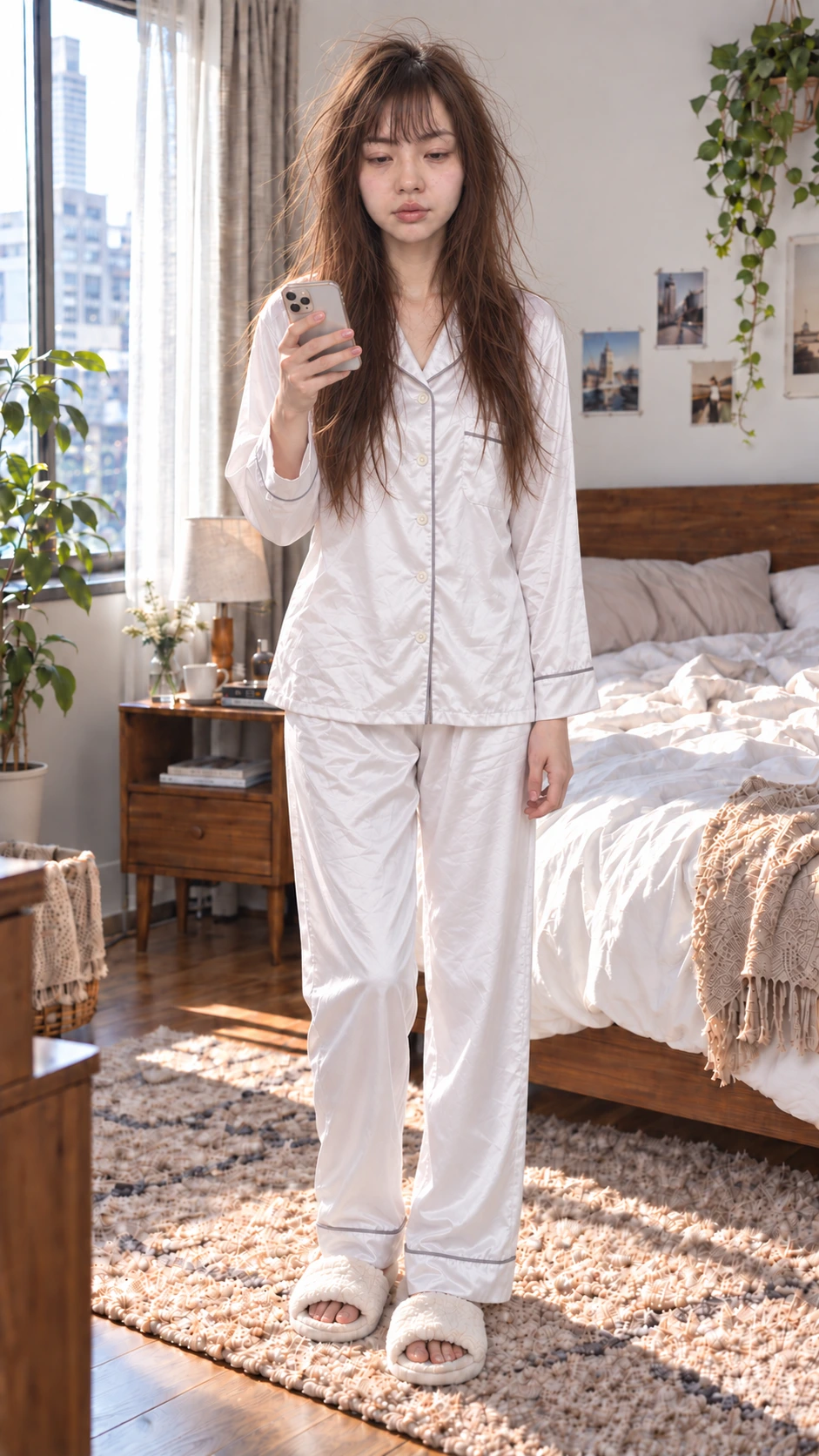
@Image1|臥室・固定人物
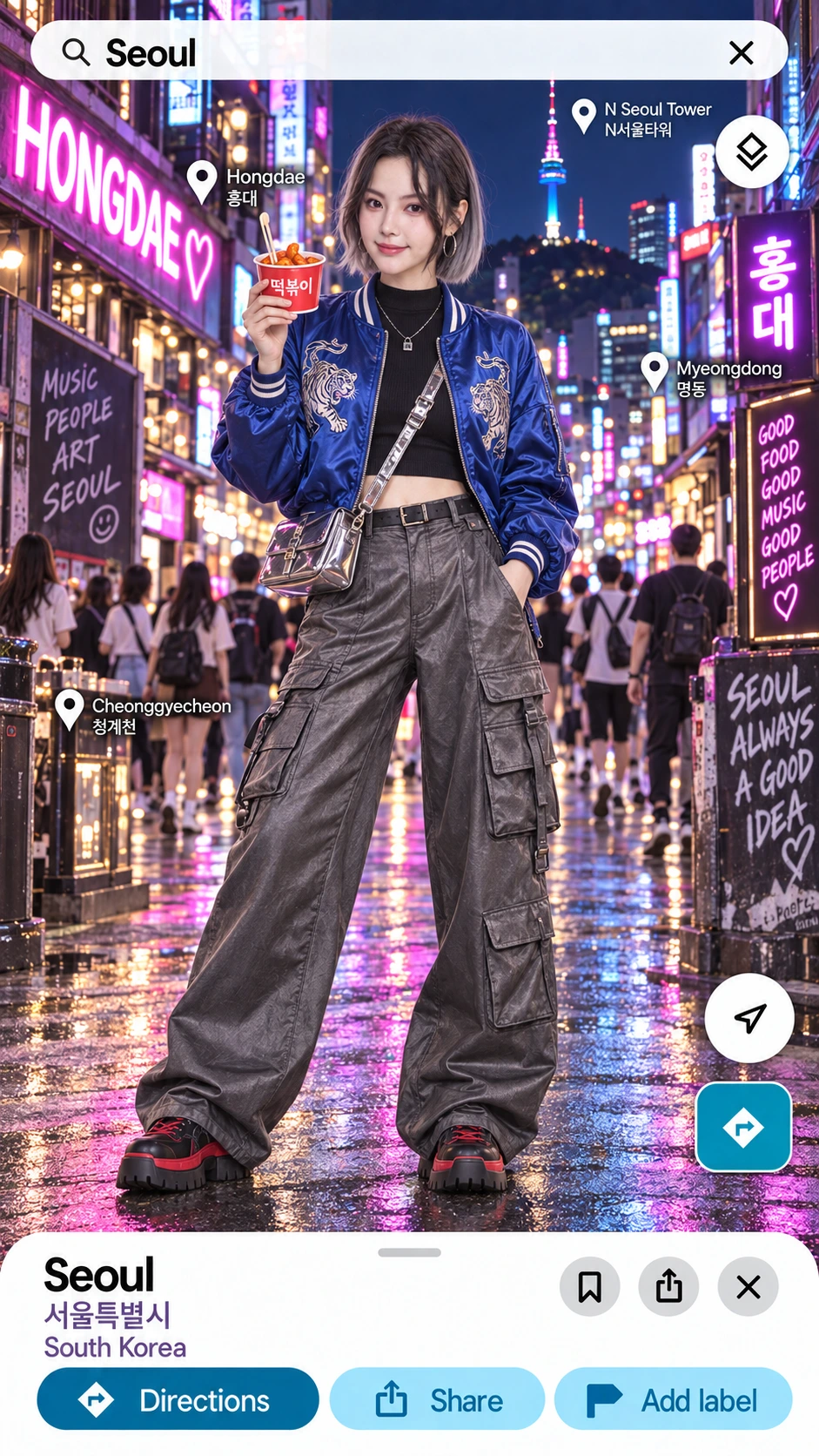
@Image2|首爾・辣炒年糕
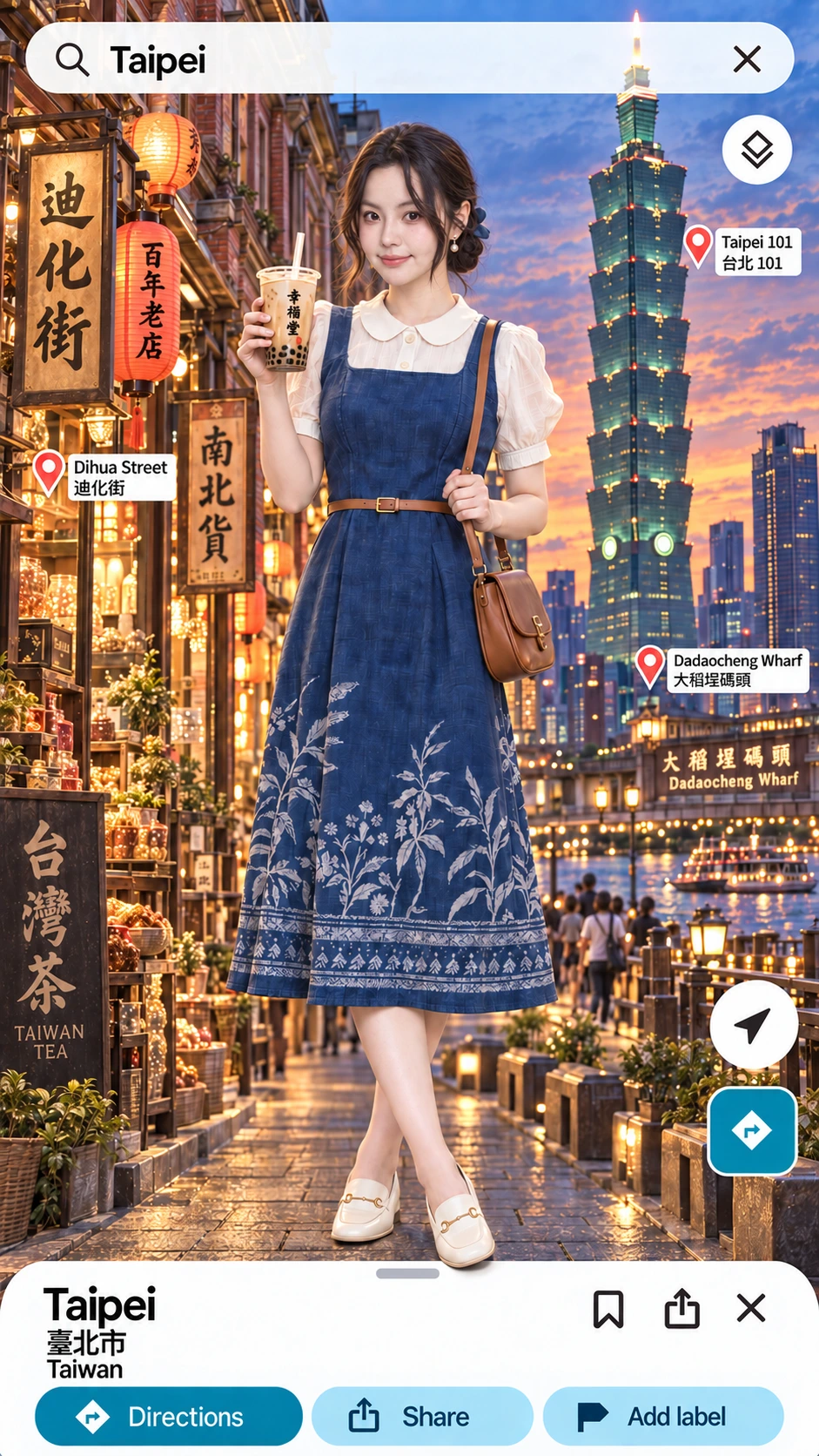
@Image3|台北・珍珠奶茶
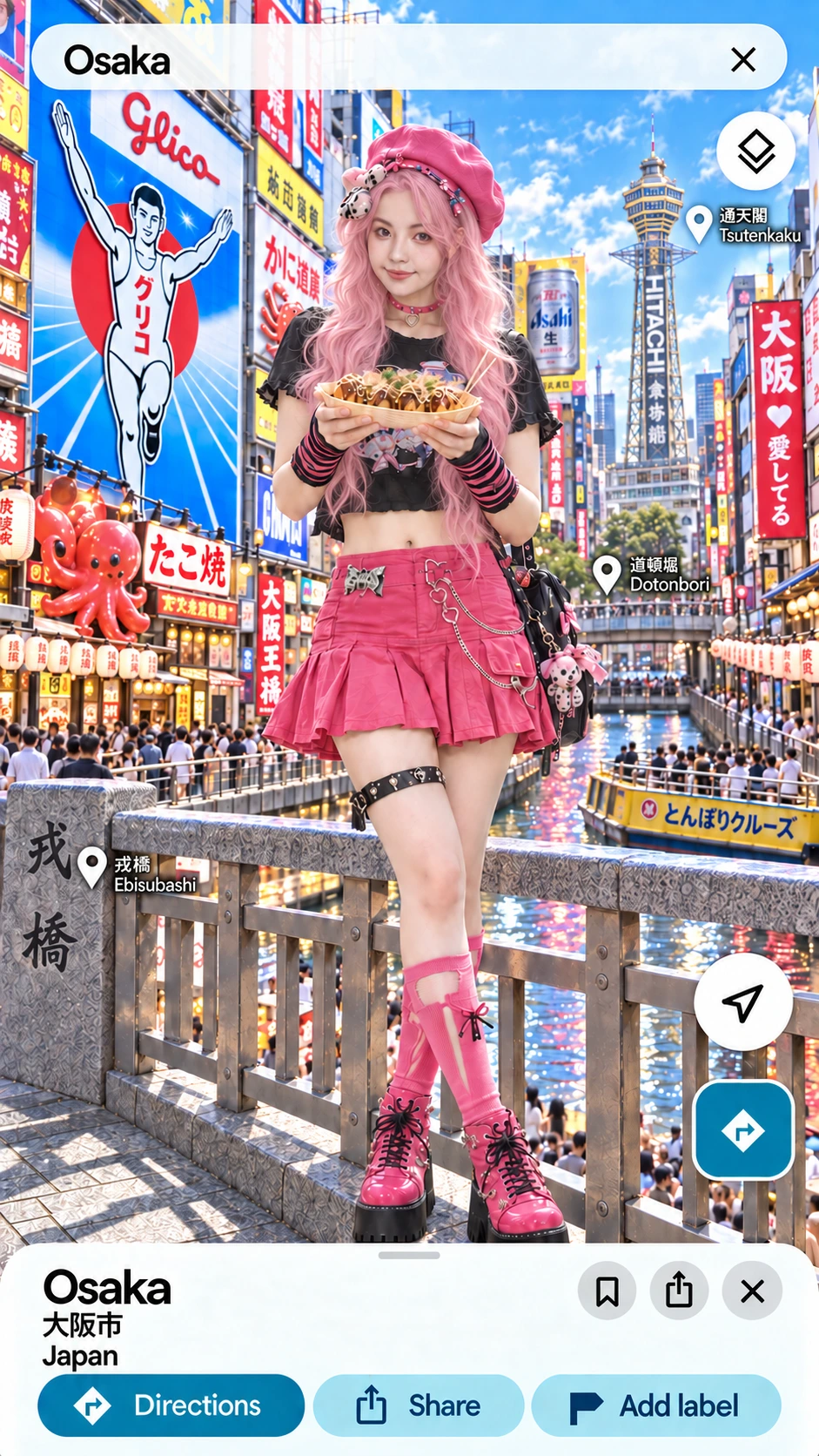
@Image4|大阪・章魚燒
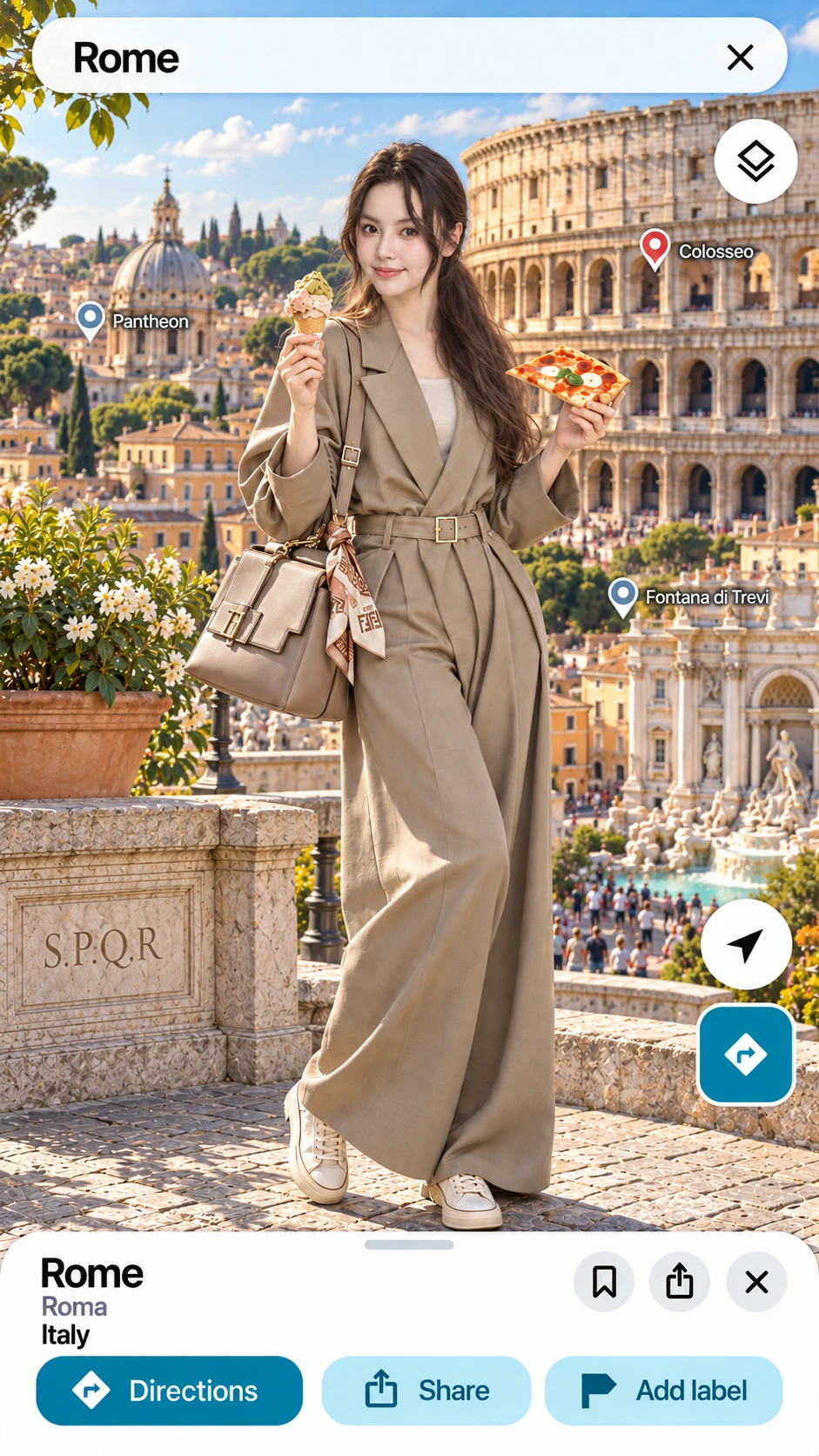
@Image5|羅馬・披薩冰淇淋
上方按臥室、首爾、台北、大阪、羅馬排列,對應下方的素材標記;圖片提供細節參考。城市圖含地標拼貼與地圖介面,是創作參考,不是實際地圖或拍攝位置。搜尋欄、按鈕和地名若要清楚固定,建議剪輯時加入。
@Image1|人物+臥室
正面、光線清楚的成人照片,作為唯一身份參考;開場使用這張圖中的睡衣與臥室。
@Image2|首爾穿搭
藍色刺繡外套、黑色短上衣、灰色工裝寬褲與紅杯年糕。
@Image3|台北穿搭
白色領口上衣、藍色刺繡洋裝、棕色腰帶與珍珠奶茶。
@Image4|大阪穿搭
粉色長髮與帽子、黑色短上衣、粉色短裙,雙手端章魚燒。
@Image5|羅馬穿搭
卡其色連身褲、淺色球鞋,畫面左側拿冰淇淋、右側拿披薩。
圖片編號是下方 Prompt 的對照方式。上傳後,請把 @Image1~@Image5 換成 Higgsfield 實際提供的素材標記,並逐一確認指向正確照片。單純把五張圖上傳完,並不代表工具已經理解每張圖的用途。
先把每一站的城市、衣服、食物排好
參考圖決定穿搭;城市與美食則要在指令中寫明。本例以四張城市圖的氛圍規劃:首爾霓虹夜景、台北黃昏地標拼貼、大阪日間街景、羅馬日間地標拼貼,並非實際旅行或拍攝紀錄。
- 0~2.4 秒|臥室開場打哈欠、看手機、點一下螢幕,再抬頭。先交代出發的動機。
- 2.4~5.5 秒|首爾轉身到背面時,換首爾衣服、弘大夜景與辣炒年糕;回正面後短暫看向紅杯。
- 5.5~8.5 秒|台北以相同方向轉身,換台北衣服、迪化街與珍珠奶茶;回正面時把杯子輕輕抬起。
- 8.5~11.5 秒|大阪再次轉身,換粉髮與大阪穿搭、日間城市背景及章魚燒;雙手接穩托盤,再看向鏡頭。
- 11.5~15 秒|羅馬最後轉身,換羅馬衣服、競技場、披薩與冰淇淋;回到正面站穩,保留清楚的收尾。
這些秒數是分鏡目標,生成後仍要檢查切換位置。本例先採固定鏡頭、人物完整轉身,讓你容易核對構圖;等動作穩定後,再另練鏡頭環繞。
背對鏡頭的時候換,回正面後再展示
換場景需要一個明確的切點。這份 Prompt 把四次切換安排在完全背對鏡頭的姿勢,並保持人物大小、身體中心、支撐腳和手臂高度接續,避免新場景一出現,人物就突然換位置。
道具也要跟著換:手機到紅杯年糕、紅杯年糕到奶茶、奶茶到章魚燒,最後變成披薩與冰淇淋。每次都交代誰在拿、拿在哪個高度,以及回正面後做什麼小動作。不要只寫「到下一個城市」,讓模型自行猜食物和手勢。
到 Higgsfield 準備素材,再複製指令
本例的既有操作紀錄是在 Higgsfield 的 Video 中使用 Seedance 2.0 與可加入多張參考素材的模式。加入五張照片,確認各張素材的實際標記,再以本例的 15 秒、9:16 規劃設定輸出。解析度、音訊與點數,先在你的生成面板核對。
新手可以先縮成「臥室 → 首爾」練一次轉身,確認臉、衣服和手勢穩定,再增加城市。這份完整 Prompt 是四站的構圖與動作規劃,不代表每次生成都能精準依秒點切換。
前往 Higgsfield ↗
工具操作可對照 Higgsfield 官方 Seedance 說明。優惠與功能請以你開啟的頁面為準。
可複製 Prompt:轉身穿越四座城市
下方是可直接複製的英文製作指令。你只需要先對好五張照片;要換目的地,就一起修改城市、穿搭圖片與美食。Hongdae 是弘大、Dihua Street 是迪化街、Dotonbori 是道頓堀、Colosseum 是羅馬競技場。
四城轉身旅行影片 Prompt
先加入五張參考照片,替換實際素材標記,再核對15秒與9:16設定。
四城轉身旅行影片 Prompt
SCENE CONTEXT / ACTIVE REFERENCES
Create one 15-second vertical travel-transformation video with one adult woman.
@Image1 is her sole identity reference and the opening bedroom/pajama reference. Her face geometry, eye spacing, nose, lips and chin proportions match @Image1 throughout.
@Image2 supplies the Seoul outfit; @Image3 the Taipei outfit; @Image4 the Osaka outfit; @Image5 the Rome outfit. These four images guide the matching wardrobe, accessories, hairstyle, city atmosphere and food. Facial identity always comes from @Image1.
@Image1: pearl-white satin pajamas, fluffy slippers, sleep-tousled hair, smartphone.
@Image2: cobalt-blue embroidered satin bomber jacket, black cropped top, grey wide cargo trousers, chunky black/red shoes and a silver crossbody bag; a red paper cup of spicy rice cakes.
@Image3: white collared blouse, blue embroidered sleeveless dress, brown belt and shoulder bag, cream loafers; an upright bubble-tea cup.
@Image4: pink wavy wig, pink beret, black cropped top, pink mini skirt, striped sleeves and pink platform boots; a takoyaki tray supported with both hands. Match the wig and accessories while preserving the facial geometry from @Image1.
@Image5: khaki belted wide-leg jumpsuit over a light top, pale sneakers and handbag; a gelato cone in her right hand (frame left) and pizza in her left hand (frame right).
Use the city images as stylized landmark collages, rather than literal real-world viewing positions. The generated frame presents the person, city and food as a clean cinematic scene; map labels, search bars and buttons are separate editing overlays.

SPACE / FIRST FRAME
Begin in the bright bedroom shown in @Image1. She is standing in the center, framed from head to shoes, holding a smartphone. Her shoulders rise with a quiet yawn; she looks down at the phone and taps the screen, then looks up as its light catches her face.

CAMERA
Use a fixed camera and a 67-degree full-body field of view. Keep her body center, scale, camera height and head-to-shoes framing constant. The woman turns; the camera keeps the same viewing position. Each turn passes through profile, full back, opposite profile and front.

ACTION / TIMING
0.0-2.4 seconds: bedroom opening. Yawn, tap the phone, look up; keep the action small and readable.
2.4-5.5 seconds: she completes one smooth complete turn in this order: front, nose toward frame left, full back, nose toward frame right, front. At the full-back pose around 3.2 seconds, match her body pose and replace the bedroom with a Seoul Hongdae night street and the outfit with @Image2. The phone becomes a red paper cup of spicy rice cakes held upright in her right hand at waist level. Finish the turn facing the camera; look at the red cup, then smile gently.
5.5-8.5 seconds: repeat the same complete clockwise turn. At the full-back pose around 6.3 seconds, change to the @Image3 outfit and a Taipei Dihua Street-inspired landmark collage at dusk, with Taipei 101 as a stylized distant landmark guided by @Image3. Replace the red cup with one upright bubble-tea cup in her right hand, keeping the supporting hand at the same height. Finish facing front and raise the cup slightly.
8.5-11.5 seconds: repeat the complete clockwise turn. At the full-back pose around 9.3 seconds, change to the @Image4 outfit and an Osaka Dotonbori-inspired city scene in bright daylight, guided by @Image4. Replace the cup with a takoyaki tray held securely in both hands. Finish facing front, glance down at the tray and look back to camera.
11.5-15.0 seconds: repeat the complete clockwise turn. At the full-back pose around 12.3 seconds, change to the @Image5 outfit and a Rome landmark collage with the Colosseum in warm daylight, guided by @Image5. Place a gelato cone in her right hand (frame left) and a pizza slice in her left hand (frame right), keeping wrist positions continuous through the replacement. Finish facing front; settle both feet and smile to camera through the final beat.
Each timestamp is a target for the planned performance. Complete each turn smoothly before the next one begins.

LIGHTING / PERFORMANCE / PHYSICS
Use soft window light in the bedroom, storefront/neon light in Seoul, diffuse dusk light in Taipei, bright daylight in Osaka, and warm daylight in Rome. The woman's skin, clothes, food and contact shadows share the light of the current environment.
Use alternating grounded steps, gentle acceleration and deceleration, natural breathing and irregular blinks. Hair and fabric follow the turn with delayed inertia and settle when she faces front. Hands grip each container naturally; drinks stay upright and food remains supported.

SOUND
Bedroom birds and a quiet phone tap; then localized street ambience for each city. Keep the environmental sound changes aligned to the visual scene changes.

OUTPUT / POSITIVE LOCKS
15 seconds, vertical 9:16, realistic editorial live-action appearance. One adult woman, one identity from @Image1, stable body scale and full-body framing. Wardrobe, location and food change together only at the four designated full-back poses. Preserve the turn direction and supporting hand positions across each change. The final Rome front-facing pose is stable and readable.
完成後,先看四個容易出錯的地方
- 臉是否同一個人: 逐站核對五官比例;如果開始換臉,先確認只有第一張圖負責人物身份。
- 穿搭、場景、食物是否同站: 台北穿搭要搭配台北場景與珍奶,別把上一站的道具帶到下一站。
- 轉身是否接得上: 看身體位置、手臂高度與腳掌支撐,切換前後不應突然跳位。
- 展示時間是否足夠: 每站回正面後要有短暫停留;如果太趕,先減少站數,讓動作和食物看得清楚。
這篇練習把「素材分工、轉場切點、道具連續性」放在一起。先做好一次可靠的切換,再擴成完整路線,會比每次同時修改所有設定更容易找出問題。
四個系統,怎麼分開排查?
把身份、站點、動作與道具分開,能減少一次修改所有條件的混亂。
| 問題 | 核對 | 先處理 |
|---|---|---|
| 臉不同 | 人物身份來源 | 移除穿搭圖的身份混用 |
| 城市與服裝不合 | 四站對照與素材標記 | 修正站點資料,不只改文字地名 |
| 切換突然跳位 | 身體中心、支撐腳與人物大小 | 固定構圖,減少站數 |
| 食物換錯或掉落 | 手別、容器與高度 | 清楚安排持握與替換時刻 |
| 每站看不清楚 | 展示時間與動作密度 | 減少內容,不只加速旋轉 |
地圖搜尋欄、按鈕與地名若要固定可讀,改在剪輯階段加入。生成圖上的介面不應當作真實地圖資訊。
每次測試,記錄哪些資料?
記人物與每站參考、模型設定、Prompt 版本、出錯站點與秒數,以及下一版只改哪一項。原始素材與生成結果分開存,保留可用段落。
常見問題
一次必須跑四座城市嗎?
不用。先完成一次可信的切換,再增加站點,降低同時檢查的變因。
一秒環遊世界是影片長度嗎?
不是,原文用作創意名稱,案例規劃為 15 秒,不把宣傳名稱當實際時長。
道具一直換錯,可以先不拿食物嗎?
可改成更簡單的練習,但要同步調整圖片、指令與分鏡,不能保留互相矛盾的參考。